

ADtools - the window for real-time
Develop faster with ADtools
ADtools consists of stand-alone Windows programs that let you directly to the data, variables and functions of the ADwin access systems. Each ADtools object can be easily parameterized and calibrated individually. ADtools on each ADwin CD included for free.
The ADtools support you from the outset in the programming of your ADwin system. The intuitive graphic interface makes it easy to project development significantly. The data presented here, you can save files, print them directly into Excel, or include them in several graphics formats in the clipboard. Finished orders of ADtools can be saved in a configuration file.
The manifold possibilities of ADtools :
- ADwin operating system, transmitted stop real-time processes load / start /
- Display ADwin system resources, process timing, process management, etc.
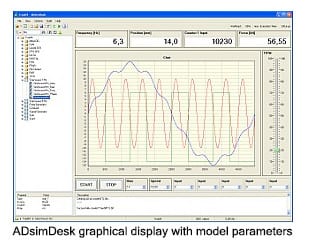
- Graphical display of data sets than curves with features for zooming, printing, saving, taking over the clipboard and data export to Excel, values, mouse selection, etc.
- Numerical input and formatted display of individual values
- Analog value representation for hand tools with color display range
- Parameter or limit monitoring functions with LED display (lights / flashing)
- Slider and potentiometer values ??for graphical input
- Continuous measurement of storage ADwin FIFOs in binary or ASCII format, single file size adjustable, automatic file numbering, file and column headers can be defined
- Project management of ADtools , saving of existing settings in configuration file
- Binary and hex display of individual values, setting of individual bits via the "DIP Switches"
- Representation and input of strings for serial and bus communication
The control options of ADtools are well suited for visualizing simple test sequences. For more complex applications, you can create a complete user interface to create, for example with Delphi, Visual Studio. NET, or LabVIEW, DASYLab, MATLAB, DIAdem, etc.
ADtools contains:
- TGraph
- TProcess
- TPar_FPar
- TButton
- TFifo
- TString
- TBin
- Tleds
- TPoti
- TMeter
- TDigit
|
|