


Data Loggers For All Applications
Data Loggers for All Applications
1 - 800 - 956 - 4437
M-Th 8A-5:30P(EDT)
Fri     8A-4:30P(EDT)
Find a data logger by selecting an application from the list below.
Request Pricing & Information
Home -> Influx Technology -> DiaLog Software

DiaLog Software

Connect to the Rebel xt with DiaLog

Product Overview
  • Construct complex data logging configurations using a simple graphical interface
  • Collect data using ISO 14229 and 15765 Diagnostic Protocols, CCP and directly from a CAN bus
  • Efficient database system allows simple administration of configurations and data
  • USB, GPRS and Bluetooth connectivity to Rebel data logger
  • Reconfigure and retrieve data by direct and remote connections
  • Live connection allows real time review of data while recording
  • Complex triggers with up to 30 conditions and 30 actions


Manufacturer - Influx Technology

Model Number - DiaLog

Product Spec Sheet

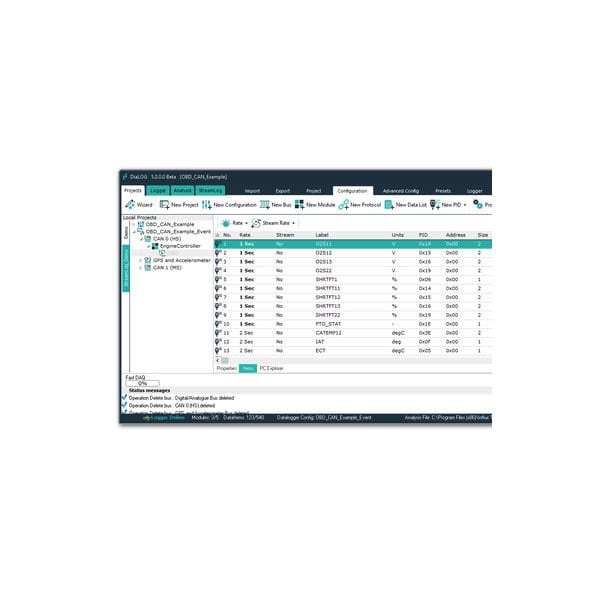
Easy to Use Intuitive Configuration Editor


Our intuitive editor allows you to configure the data logger easily. It is simple to collect data on several CAN buses using different protocols simultaneously.

Functions at a glance

  • Builds the Rebel xt logger configurations
  • Formats and reads the SD cards
  • Connects to the Rebel xt via Bluetooth,GPRS or USB
  • Data analysis
  • In field firmware upgrades

EOBD Database


The powerful integrated database stores OBD data allowing you to configure the Rebel xt to record powertrain data on almost any modern road vehicle.

EODB Data

  • Mode 1 PIDs
  • All OBD Fault Diagnostic codes
  • Supports ODX,MDX and GDX
  • Easy to user editor

Compatible File Formats


Most industry standard file formats are supported such as CAN DBC files. Recorded data can be exported to several formats.

File Formats

  • ASAM A2L
  • CAN DBC
  • MDF
  • Matlab MAT
  • CSV for data analysis with Excel

Data Analysis


Dialog includes DataVue a professional data analysis package which allows you to analyse your data quickly.

Some Analysis Features

  • Twin X axis Cursors
  • User defined templates
  • Post calculated channels
  • Edit notes
  • Zooming in/out points of interest
  • Show sample points
  • Overlay multiple data files

Fast Data Analysis


DataVue is Influx Technology’s dedicated data analysis tool. Capable of a complex array of data manipulation and display, DataVue brings your data to life graphically. It can handle large amount of data with ease and is a very fast tool. For example on a typical computer it will load a data file of 200Mbytes in approximately 20 seconds!

The DataVue data analysis tool is incorporated in to our Module Analyser and Dialog software packages, providing the user with two powerful software tools.

Data Analysis


DataVue provides complete oscilloscope functionaility.

Some functions at a glance:

  • Zoom in and out of points of interest
  • Twin cursors
  • Attach notes to data series
  • Easy to attach data to a single axis or a separate axis
  • Align data on the time axis by offsetting data series
  • Overlay plots and rescale
  • Hide/Show data series

Advanced Features


DataVue has several advanced features which extend the capability of the tool.

  • Calculated channels allow you to post process the data and recalculate a new signal from the data signals recorded
  • Functions such as moving average, best fitting etc...
  • Both XY and XYZ scatter plotting of data
  • Saving and loading templates, making it easy to analyse several similar files quickly
  • Merging files

Data Handling


DataVue includes a number of data handling capabilities.

  • Import and export .MDF, .MAT (Matlab) and .CSV file formats
  • Printing and exporting to PDF format

Request Pricing & Information

If you need information right away or prefer to speak with a person, call us and one of our Experienced Applications Engineers will be happy to talk with you. You can reach us at 1-800-956-4437 during our normal business hours Monday - Friday from 8am to 6pm (EDT).

After filling out the form below, an applications engineer will contact you within at least one business day.

Indicates a required field.

Fields that are not required are recommended to be filled out so that we can better assist you.

Request Form

Name Address 1
Email Address 2
Phone # City
Company State
Job Title Zip
Fax # Country
Product(s)

of Interest
Application
Additional

Information
Human Verification What is the next number after 4?  
Newsletter Sign Up - Here at CAS Data Loggers we are constantly publishing new articles, and now you can receive monthly emails to see what's new. By signing up for our monthly newsletter, you will also receive the newest application notes where our products are being used and many other resources such as white papers, videos, technical articles and new product information.

Home | About CAS | Policies | Distributor Login | Systems Integrators

©2011 Computer Aided Solutions, LLC.