
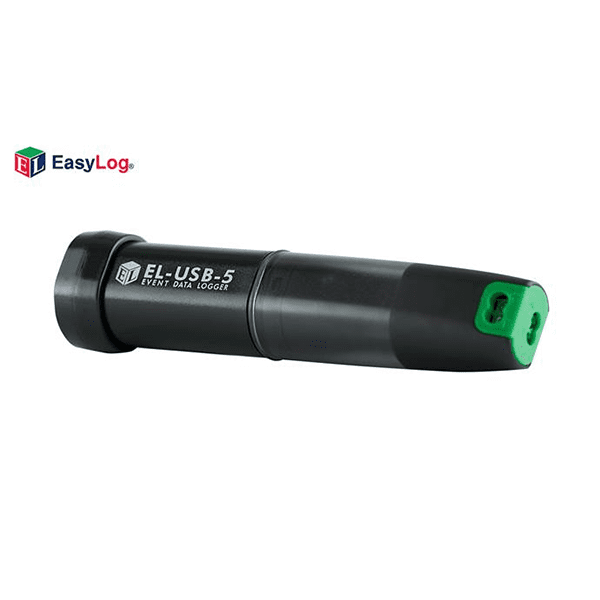
EL-USB-5 USB Event Data Logger
Event/State/Count Data Logger
|
Product Overview
|
Counter, Event and State USB Data Logger
This standalone data logger can record events (detecting an input and storing the time and date of occurrence), record state changes (similar to an ‘event’ but also recording when the input reverts back to normal) and count events (count the number of events that happen in a time period, without any individual event time or date information). Up to 32,510 events or 32,510 state changes can be recorded.
Events and state changes can be triggered by either a rising edge (a voltage going from low to high) or falling edge (a voltage going from high to low). It is also possible to use volt free contacts. Instead of measuring an external voltage, the data logger applies a voltage across the screw terminals and detects when the input closes (i.e. a relay or microswitch).
Fast logging rates allow event capturing at speeds of up to two times per second and state changes at speeds of up to five times per second. Event counting can operate at speeds of up to 100 times per second (when the LEDs are turned off). The user can easily set up the logger, and download the stored data by plugging the data logger into a PC’s USB port and running the purpose designed software under Windows 2000, XP, Vista & 7. Data can then be graphed, printed and exported to other applications.
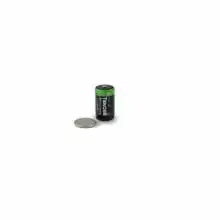
The data logger is supplied complete with software, measurement leads terminated with crocodile clips and a long-life lithium battery which allows logging for up to 1 year. Functionality of the unit is indicated by flashing red and green LEDs, with an option to flash the red LED every time an event occurs.
LED Flashing Modes
EL-USB-5 features a red and a green LED to indicate the status of the data logger.
| Specifications | Minimum | Typical | Maximum | Unit |
| Time between events | 200 | Milliseconds | ||
| Time between state changes | 500 | Milliseconds | ||
| Time between event counts | 10 | Milliseconds | ||
| Input voltage ** | 3 | 28 | V d.c. | |
| ‘Volt free contacts’ voltage | 2.75 | 3.6 | V | |
| ‘Volt free contacts’ current | 35 | µA | ||
| Timing accuracy | ±3 | Seconds per 24 hours | ||
| Operating temperature range | -35 | +80 (176) | ºC (ºF) | |
| 1/2AA 3.6V Lithium Battery Life | 1 | Years |
* depending on ambient temperature, logging rate and use of alarm LED.
EasyLog Software
The core of Lascar's data logging solution is the free software supplied with each data logger. Using a wizard format to guide the user through setup of the data logger and subsequent download of collected data, the software puts the 'easy' into EasyLog.
Video Demonstrations of EasyLog Software
|
How to setup an EL-USB data logger |
Downloading data demonstration |


Features
- Collects and stores data from at least 500 data loggers
- View downloaded data with general trend and summary screens
- Allows full or quick set-up of compatible EasyLog USB data loggers
- Touch screen interface for navigation of menus
- 2.8” TFT display
- Stored data can be transferred to a PC/Mac via micro USB cable
- Use Lascar’s EasyLog USB software on a PC to graph data and export to Excel
- Integral rechargeable lithium battery provides up to 8 hours use (nominal)
The EL-DataPad allows users of Lascar’s EL-USB data loggers to configure their units and download data and view logging results on-thespot rather than removing the logger from the environment being measured and taking it to their PC. This allows continual logging with shorter breaks in data collection, less travel for the user, on-site data collection in graph, legend and summary format and the ability for users to reconfigure loggers in ‘the field’.
The logger is connected to the EL-DataPad via a standard USB port at the top of the viewer. Once connected, the user is guided through a simple touchscreen menu with options to Set-Up Logger, Stop Logger & Download and View Data. On-screen instructions follow the same structure as Lascar’s EL-USB-WIN software for PC currently provided with each data logger.
Data from up to 100 loggers can be viewed on the EL-DataPad, with data from a further 400 units stored on the unit at any one time. Data can be transferred to a PC or Mac using a micro USB cable supplied with the unit. Once uploaded, data is saved in comma separated variable (csv) format, making it suitable for import into spreadsheet packages such as Microsoft Excel or graphed on a PC using Lascar’s EL-WIN-USB software .
The EL-DataPad is compatible with the following EL-USB data loggers: EL-USB-1, EL-USB-1-LCD, EL-USB-1-PRO, EL-USB-2, EL-USB-2+, EL-USB-2-LCD, EL-USB-2-LCD+, EL-USB-TC, EL-USB-TC-LCD, EL-USB-LITE.
Hardware
- Battery: Lithium Polymer, rechargeable via micro-USB connection.
- LCD: 240x320 2.8” TFT with touch-screen.
- Internal Flash memory.
- Single front-panel push-button used for power-switch. Single press=ON, press & hold for 3 sec = OFF.
- 1x USB Type A socket (top of unit) for connection of Lascar data loggers.
- 1x micro-USB (bottom of unit) for connection of unit to PC via 1m
- USB cable supplied
|
By pressing on the Set-Up Logger icon shown above, users can name their data logger, select a sample rate, set high and low alarms and choose the logging start time. Simply press the green icon and follow the on-screen instructions. |
|
Connect the data logger to the EL-DataPad, press the red arrow and follow the on-screen instructions. |
|
The EL-DataPad enables you to view graphical data that is stored in memory. To view data, press the blue graph icon and select the file you wish to view by following the on-screen instructions. |
Request Pricing & Information
If you need information right away or prefer to speak with a person, call us and one of our Experienced Applications Engineers will be happy to talk with you. You can reach us at 1-800-956-4437 during our normal business hours Monday - Friday from 8am to 6pm (EDT).
After filling out the form below, an applications engineer will contact you within at least one business day.
* Indicates a required field.
Fields that are not required are recommended to be filled out so that we can better assist you.