

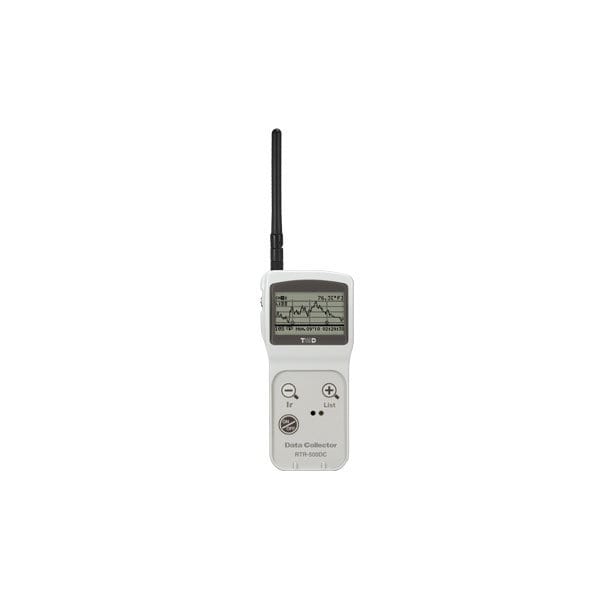
RTR-500DC Wireless Data Logger Handheld Data Collector
Wireless Handheld Data Collector
|
Product Overview
Description The RTR-500DC is a user-friendly wireless communication Data Collector designed for hand-held portability. By carrying out wireless communication with Data Loggers, it is possible to start and stop recording and collect data from loggers placed in remote locations without having to manually gather them. The collected data can then be easily displayed in graph form in the LCD display of the RTR-500DC, enabling the immediate on-the-spot checking of data. |
Wireless Communication Data Collector
The RTR-500DC can collect recorded data from Remote Units via wireless communication. The wireless communication range, if unobstructed and direct, is about 150 meters (500 ft). By setting up RTR-500 unit(s) as Repeater(s), it is possible to extend the wireless communication range.

On-site Graph Display
The data collected to the RTR-500DC can be immediately viewed in graph form on the spot without the need for a computer. A graph is displayed for each channel of data. It is possible to view, for example, four channels of data measured and recorded by the RTR-574 by pressing the Operation Dial to switch the channel for viewing. A simple yet functional graph of the RTR-500DC enables you to check the judgement result weather the set Upper/Lower Limit has been exceeded or not, check the highest and lowest readings, as well as zoom in and out.

Monitoring for Warning and Current Readings
Using the monitoring function, the RTR-500DC carries out wireless communication at a set interval with the registered Data Loggers (Remote Units) to monitor Current Readings and Remote Unit Status. The RTR-500DC also monitors for warnings in Data Loggers for which the Upper / Lower Limit settings have been made via the supplied software.

Managing Remote Units in Groups with One RTR-500DC Unit
An RTR-500DC can manage a large number of Remote Units. When registering multiple Remote Units, they can be divided into Groups by location or measurement item, each of which can then be assigned a communication frequency channel. The maximum number of Groups which can be registered in one RTR-500DC Unit is 7 (seven). Within each group the maximum number of Remote Units which can be registered is 32 (If using RTR-574 the max is 16).
Operating Same Remote Units via Multiple RTR-500DC Units
Multiple RTR-500DC Units can be used to communicate with one Remote Unit. It is possible, for example, to use one RTR-500DC Unit to monitor the Current Readings and another to collect data, or to have a number of workers carry one each. It is easy to prepare the number of RTR-500DC necessary for the job. After having registered a Remote Unit its registration info can then be sent to multiple RTR-500DC (Base Units), either by using the software "RTR-500DC for Windows" and copying the Base Unit registration info into a multiple number of Base Units, or by using the "Visitor Entry" function by having the Base Unit read the Remote Unit info directly without using the software.

Application Example A:
For monitoring warnings and downloading recorded data from a Remote Unit registered as a "Visitor" in the cargo compartment of a truck.

Application Example B:
For downloading recorded data from the Remote Unit(s) registered as "Visitor" to the multiple Base Units.

Ready for Use Without Troublesome Preparation
The RTR-500DC does not need troublesome preparation such as creating a network environment or carrying out wiring. All you need is a PC and accessories to use an RTR-500DC. By using the supplied software, you can carry out registrations and settings for Data Loggers to use with the RTR-500DC Unit, as well as the Unit operations such as downloading of the collected data to a PC, saving, and graph display.
Easy One-Hand Operation
The handy Operation Dial makes the operation of the RTR-500DC simple; moving the dial up and down displays the various menu selections which can be easily selected by pressing in on the dial. Easy-to-read LCD and simple menu structure enables a quick intuitive operation on site.

Various Power Supplies and Energy Saving Function
Power is provided by two AAA alkaline batteries. It is also possible to supply power to the RTR-500DC Unit from AAA Ni-MH batteries, USB bus power, or AC adaptor (optional). The energy saving function will automatically turn off the Unit to save battery power if the Unit is not used for about three minutes.
LCD Backlight Display for Reading in the Dark
The RTR-500DC has a LCD backlight display to help you read data even in the dark. If the Unit is not used for more than five seconds, the LCD backlight will automatically turn OFF to save battery power. Once operation is re-started, it will automatically turn back ON. When the Unit is connected to an AC adaptor, the backlight remains ON.
Easy Firmware Update
The latest information and programs for the Unit, such as firmware updates, are available from the Support Page of our T&D Website. You can update the RTR-500DC firmware on your own to support the changes of the compatible devices as new models are released, for example.
Application Examples
- For downloading recorded data and monitoring current readings for moving or rotating Remote Unit(s) on production lines.
- For downloading recorded data and monitoring current readings for Remote Unit(s) in cargo compartment(s) using a Base Unit in the truck cabin.
Below you will find the list of compatible data loggers that communicate wirelessly or via serial connection with the RTR-500DC.
- RTR-501 (-40 to 80°C)
- RTR-502 (-60 to 155°C)
- RTR-503 (0 to 55°C, 10 to 95%RH)
- RTR-505-TC (Support for thermocouple sensor types: K, J, T, S)
- RTR-505-Pt (Support for RTD sensor types: Pt100/Pt1000)
- RTR-505-V (Support for Voltage Signals)
- RTR-505-mA (Support for 4-20mA Signals)
- RTR-505-P (Support for Pulse Signals)
- RTR-574 (Illuminance, UV, Temperature, and Humidity)
1: Antenna Connector
2: Operation Dial
3: LCD Display
4: List Button
5: Collect Button
6: Power Button (ON/OFF)
7: Optical Communication Area
8: Slitted Area
9: Antenna
10: USB Communication Cable Jack
11: RS-232C Communication Cable Jack
12: AC Adaptor Jack
13: Battery Cover
| General | |
|---|---|
| Compatible Devices | Remote Unit: RTR-501 / 502 / 503, RTR-501L / 502L / 503L, RTR-574 Repeater: RTR-500 |
| Storage Capacity |
When downloading units at full logging capacity: 15 units of RTR-501 / 502 15 units of RTR-503 7 units of RTR-574 When downloading units at non-full logging capacity, it can store and manage up to 250 downloading sessions. * Varies depending upon the device type, number of channels, type of recorded data. |
| Internal Clock Accuracy | At +/- 30 sec/month at 25°C |
| LCD Display | FSTN 1.9 inch, 128 x 64 dpi, semi-transmissive, monochrome, amber colored LED backlight |
| Functions: Wireless Communication | Downloading and Saving Recorded Data, Monitoring Current Readings and Remote Unit Status (Warning Monitoring), Starting and Stopping Remote Unit Recording, Checking Signal Strength for Communication with Remote Unit |
| Functions: Non-Wireless Communication | Downloading and Saving Recorded Data Starting and Stopping Remote Unit Recording |
| Functions: RTR-500DC Operations | Changing Unit of Temperature, LCD Backlight, LCD Contrast, Checking Memory, Button Sound, Checking Battery Power, Auto Power Off Function (if the Unit is not used for three minutes) |
| Display Functions | Graph (Highest / Lowest Measurement, Upper / Lower Limit Settings) Data Details (Downloading Date/Time, Recording Start Date/Time, Recording Stop Date/Time, Last Recording Date/Time) |
| Types of Warning Monitoring | Upper Limit / Lower Limit Exceeded Upper Limit / Lower Limit Exceeded for Cumulative Illuminance and Cumulative Amount of UV Light (RTR-574) |
| Power | AAA Alkaline Battery x 2 *AAA Ni-MH batteries, AC adaptor (option AD-0638 or AD-0638-C), or USB bus power may also be used. |
| Battery Life | Expected battery life for 2 AAA alkaline batteries: Monitoring: 96 hours of continuous use For communication without Repeater(s) at 60 second intervals Checking Signal Strength: 32 hours of continuous use Downloading Data: 730 consecutive sessions Via wireless communication (When downloading RTR-501 at full logging capacity / without Repeater(s) / LCD backlight Off ) *Battery life varies depending upon the type of battery, the measuring environment, the frequency of communication, and the ambient temperature in which it is used. |
| Data Backup | About 1 month (Saved data will be erased if all battery power is lost.) |
| Communication Interfaces | With PC: USB Communication: 38,400bps With Remote Unit: Wireless Communication, Optical Communication: 2,400bps (Remote Units excluding RTR-574) Cable Communication: 19,200bps (RTR-574) |
| Communication Time (except Wireless Communication) | When downloading one Remote Unit at full logging capacity: -From RTR-500DC to PC USB Communication: 12 sec. (1 Ch) / 24 sec. (4 Ch) -From Remote Unit to RTR-500DC Optical Communication: about 170 sec. (Remote Units excluding RTR-574) Cable Communication: about 45 sec. (RTR-574) |
| Dimensions | H125mm x W58mm x D26.3mm (excluding protrusions) Antenna Length: 109mm |
| Weight | About 127g (including 2 AAA batteries) |
| Operating Environment | Temperature: 0 to 50°C / Humidity: 90%RH or less (no condensation) |
| Others | Not waterproof, moisture proof, or dust proof |
| Wireless Communication Specifications | |
| RF Power | FCC model 7mW / CE model 5mW |
| Communication Method | FCC Part 15 Section 247 / IC RSS-210 (Frequency Range: 902 to 928MHz) ETSI EN 300 220 (Frequency Range: 869.7 to 870MHz) |
| Transmission Range | About 150 meters [500 ft] (if unobstructed and direct) |
| Communication Time | When downloading a Remote Unit at full logging capacity: About 120 sec.* (Remote Units excluding RTR-574) About 240 sec.* (RTR-574) *The same amount of time should be added for each Repeater. |
Software Package
RTR-500 for Windows- RTR-500DC for Windows
- RTR-500DC Settings Utility
- Temperature / Humidity Graph
- Multi-Scale Graph
- Data Download Tool
- Adjustment Tools
"Settings Utility" Program makes Settings a Snap!
The Settings Utility application is used to take care of all Base Unit settings and registration of Remote Units and Repeaters. After having registered and placed the Remote Units and Repeaters in the field, it is possible to run communication tests to check signal strength between the various units to ensure stable communication.
Easy-to-Understand Operation Guide
The Operation Guide that is part of the software uses easy to understand terms to help lead you through all the necessary steps and setting procedures. If during setup you get confused or have trouble, just simply open the Operation Guide in the same on-screen window and make settings while consulting the Guide.
Difficult Cellular Phone Network Settings made Easy
When using the RTR-500GSM, we have included an “Initial Settings Wizard” which guides you through what otherwise would be the difficult process of setting up the unit for GSM network communication; just put in the SIM Card and turn on the Wizard.
Intuitive User-Friendly Graph Tools (Temperature / Humidity Graph and Multi-Scale Graph)
With either program you can view up to eight channels of data in one graph.The Graph programs intuitive operation allows the User to easily hide or view channels, zoom in and out on data, switch back and forth from °C to °F, and view data in table form.
View in Table Form
Graph data can be easily viewed as a data list. The highest and lowest values are shown in easily distinguishable colors.
From Graph Editing to Data Analysis
It is possible to hide, re-order and delete channels, edit recording start times, and make changes to colors used for the graph scale lines, data lines and background. Also move the A and B cursor at the bottom of the graph to view data readings for those points and the calculated difference between the points.By saving graph data as CSV Format Text File data, that data can then be uploaded into common spreadsheet software for data analysis.
Remote Unit Adjustment Settings
When using multiple measuring devices, this function allows the user to correct for inaccuracies found in measured values when compared to a standard measurement (the value measured by the standard device). Measurements can be adjusted and recorded based on a standard measurement. The RTR-500 Series Software allows for adjustment settings to be made to Remote Unit measurements by simply selecting the adjustment method from either "1 Point Adjustment" or "2 Point Adjustment" and entering the values for "Before Adjustment” and "After Adjustment".
Serial Communication Cable (TR-6C10)
Cable Length: 1.0m(40 in)
For communication between RTR-500DC and RTR-574
Examples of Usage:
For registering an RTR-574 as a "Visitor" to the RTR-500DC
For collecting data from the RTR-574 to the RTR-500DC via cable communication
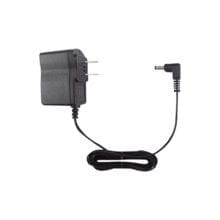
AC Adapter (AD-0605)
Input:AC 100V(90-132V)
Output:DC5V 2A
Frequency:50/60Hz
Cable Length:1.85m
Plug Figure: A
AC Adapter (AD-0607)
Input:AC 100-240V(93-264V)
Output:DC5V 2A
Frequency:50/60Hz
Cable Length:1.85m
Plug Figure: C
Application Notes
Below features our collection of application notes and case studies involving this product.
Fumigating Flour Silos Using Real-Time Temperature Monitoring
Request Pricing & Information
If you need information right away or prefer to speak with a person, call us and one of our Experienced Applications Engineers will be happy to talk with you. You can reach us at 1-800-956-4437 during our normal business hours Monday - Friday from 8am to 6pm (EDT).
After filling out the form below, an applications engineer will contact you within at least one business day.
* Indicates a required field.
Fields that are not required are recommended to be filled out so that we can better assist you.


